Sell on Mercado Livre, iFood and other platforms without leaving Odoo
K-OMS is KMEE's order management system (OMS). It publishes the Odoo catalog, price and stock to the channels, brings every order in as a sales order, and returns the invoice, shipping label and tracking to the channel. Your team stays in Odoo: no retyping orders, no stock spreadsheet, no forgotten invoice and no catalog kept in several places. Everything is managed in one place, in your ERP.
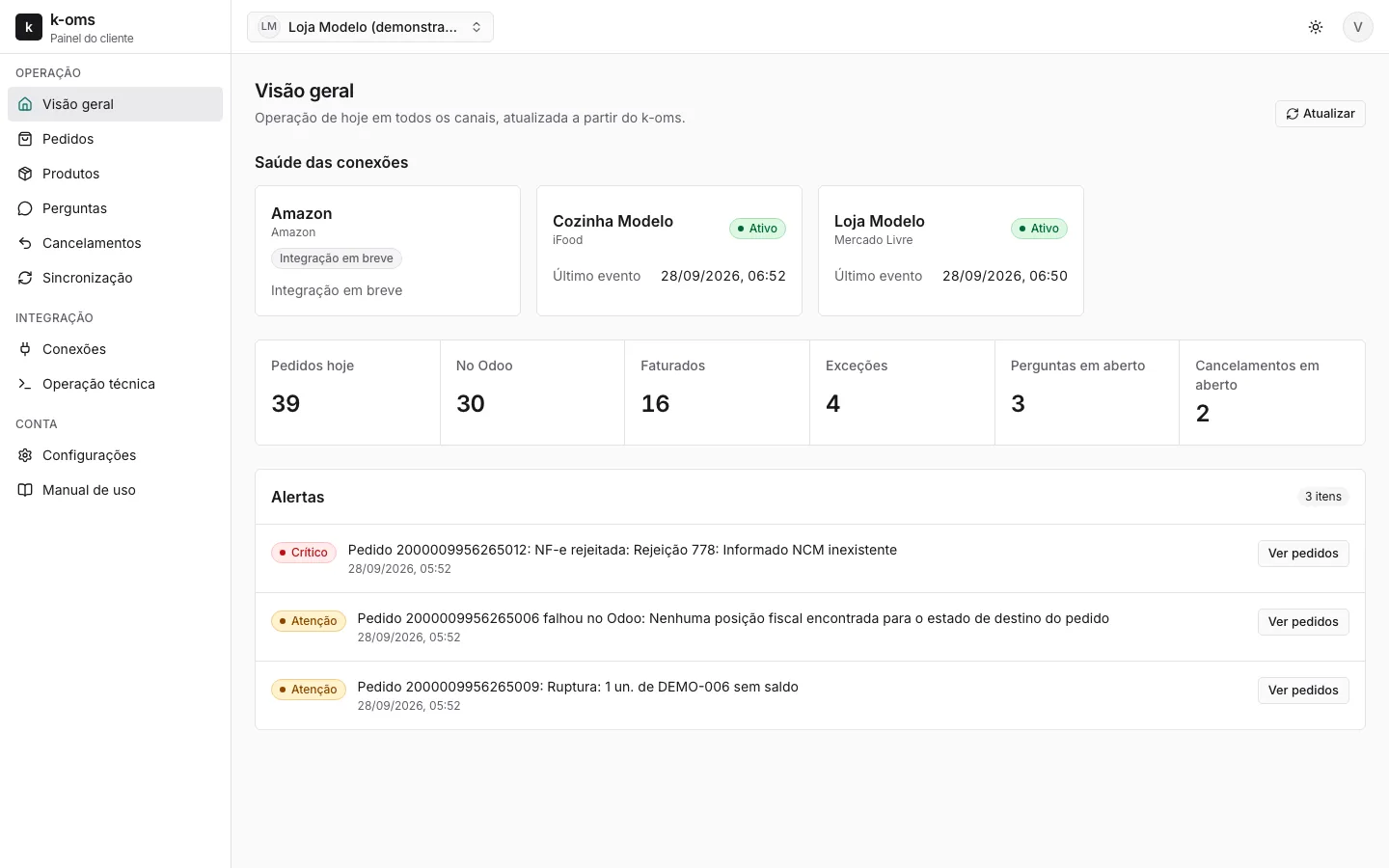
How it works
Odoo stays where your company works. K-OMS takes the catalog to the channels and brings the orders back.
- 1
Register in Odoo
Product, price list and stock per warehouse stay in Odoo. You choose which channels each product goes to and set the channel fields on the product tab.
- 2
K-OMS publishes and checks
Mercado Livre listings and the iFood menu receive what is in Odoo, with a stock safety margin per channel. K-OMS compares what is published with what should be and fixes the difference.
- 3
The order becomes a sales order
An order paid on Mercado Livre or received on iFood enters Odoo as a confirmed sales order, with customer, shipping, channel and intermediary. Missing stock becomes a visible exception, not a lost sale.
- 4
Invoice, label and tracking go back
The NF-e authorized in Odoo is sent to Mercado Livre, the Mercado Envios label is attached to the delivery for printing, and the status follows the order until delivery.
Features
Everything that needs action in one place, on desktop and mobile. Nobody has to open each channel's back office to see what is stuck.
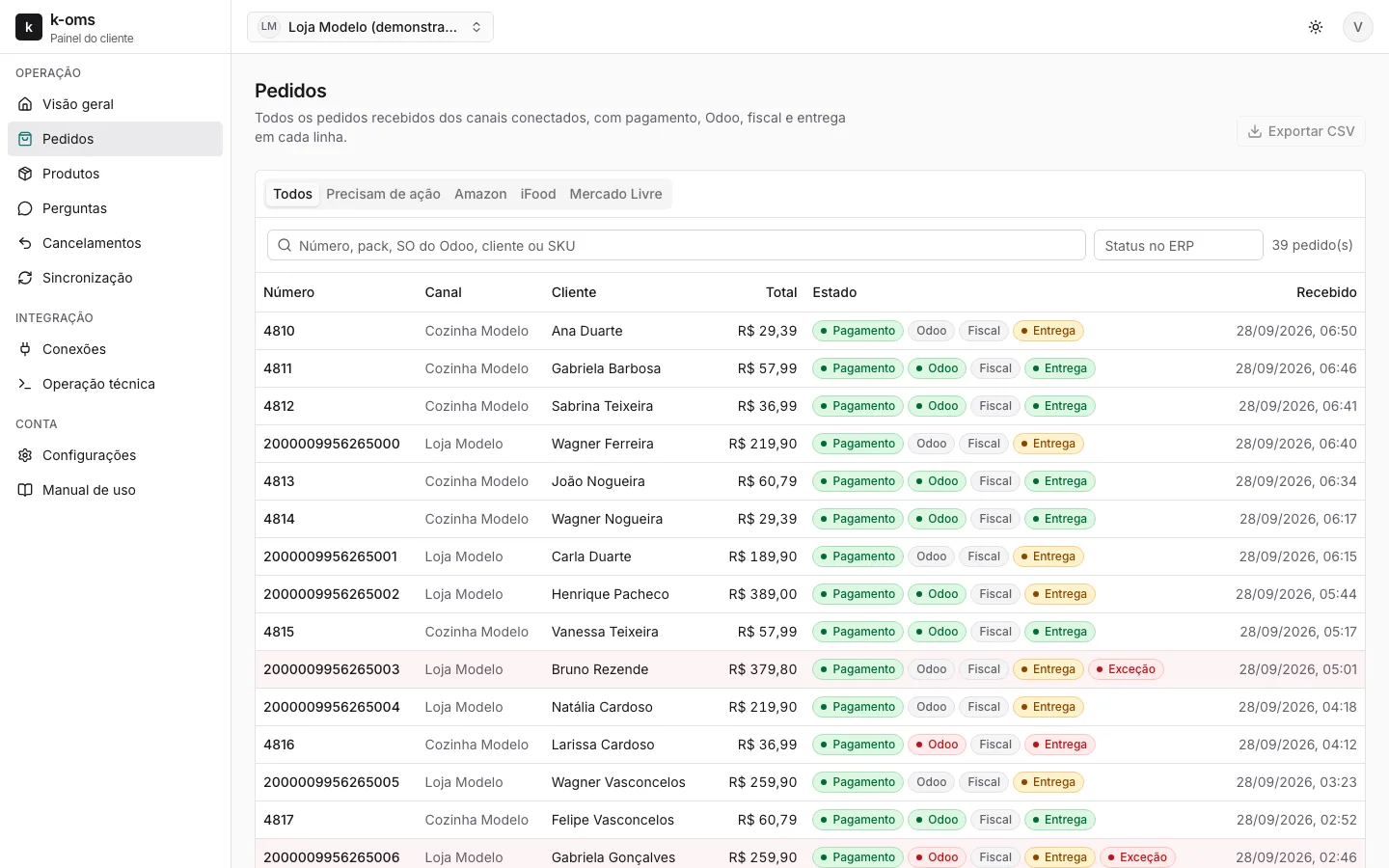
Orders
Every channel in one list, with payment, ERP, invoice and delivery status for each order.
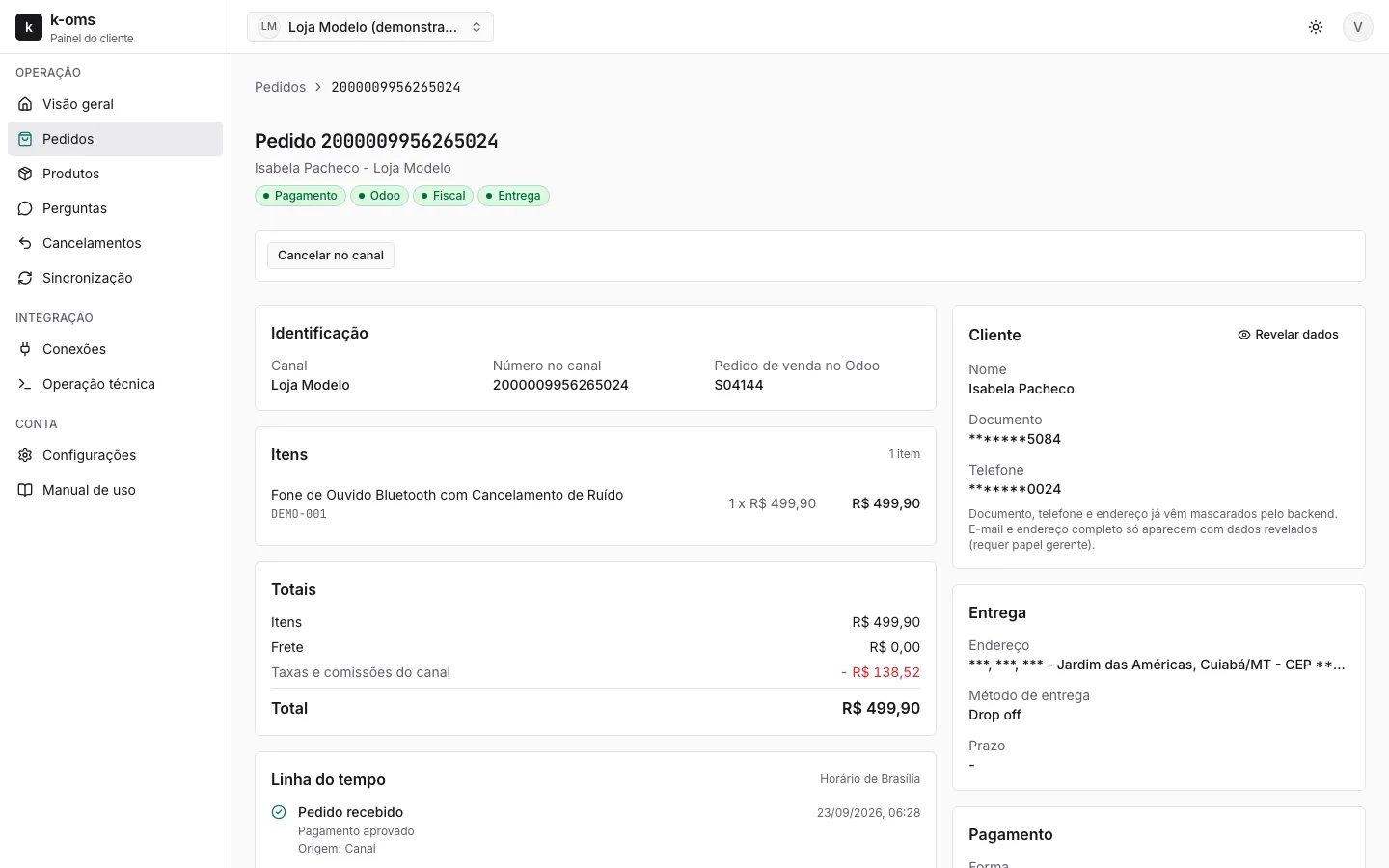
Order detail
Items, totals with channel fees, delivery, payment, invoice and the full timeline.
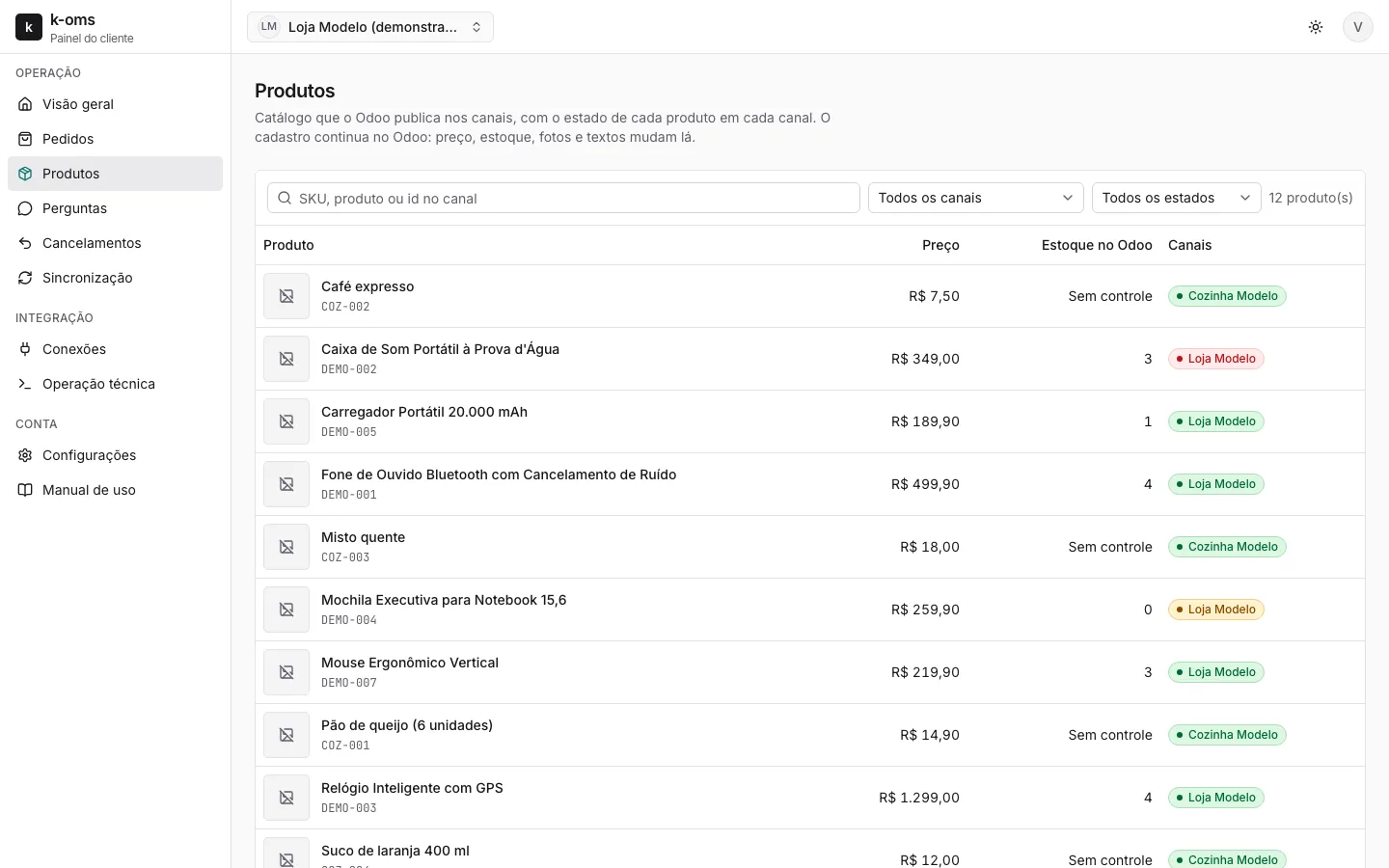
Products
The catalog Odoo publishes, with the status of each product on each channel.
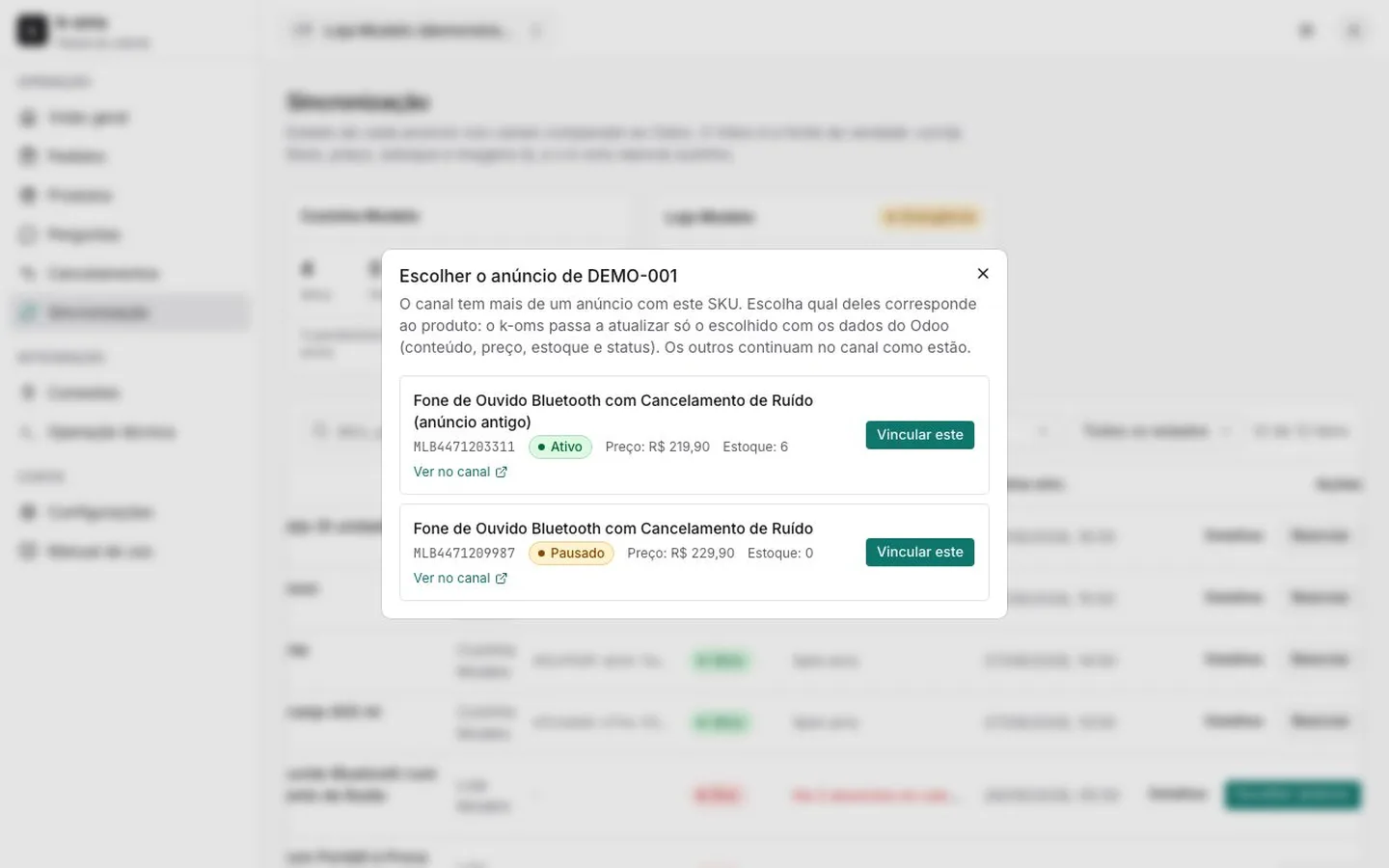
Duplicate listing
When the channel already has more than one listing with the same SKU, you choose which one K-OMS keeps updated. Nothing is duplicated.
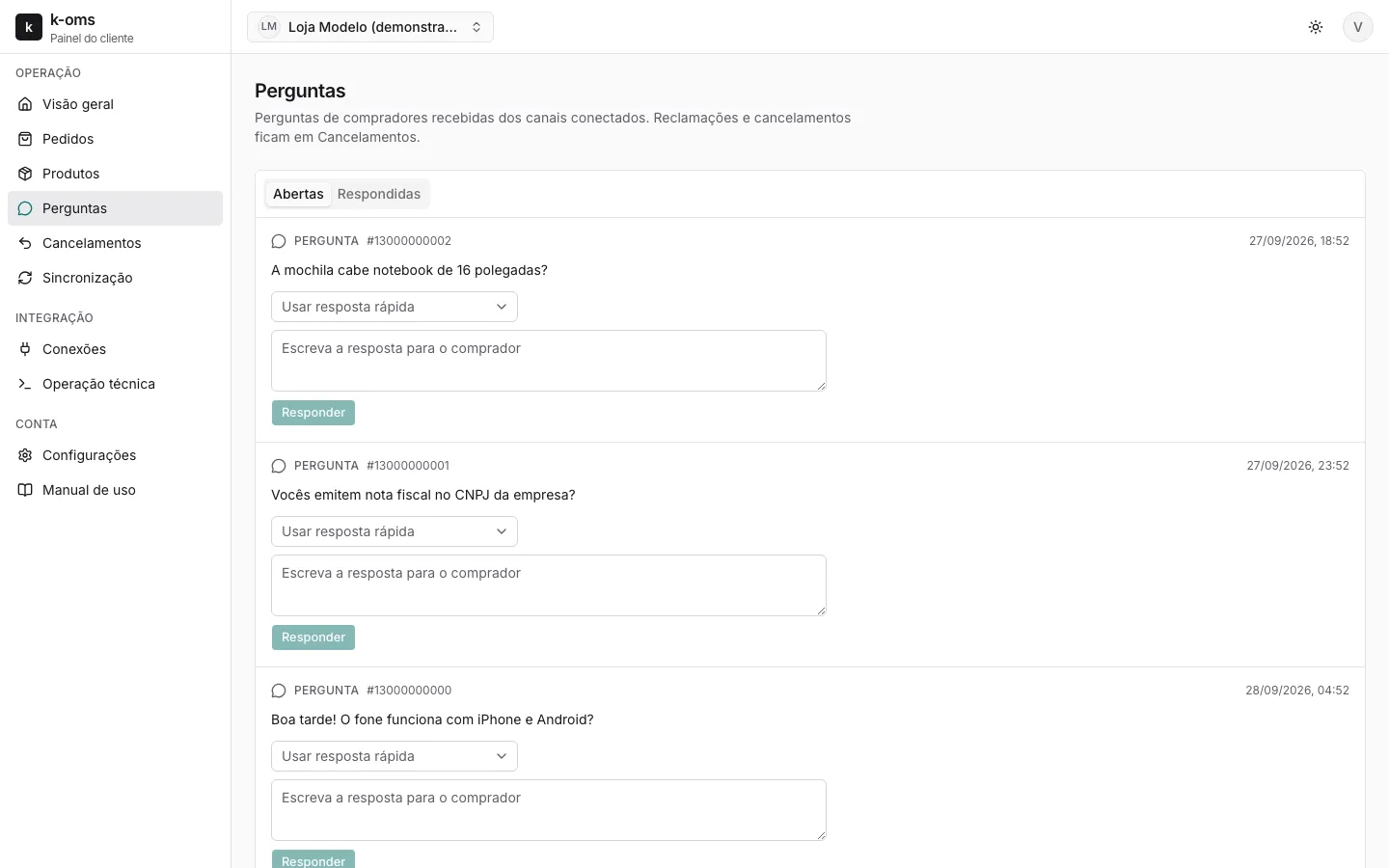
Mercado Livre questions
A queue with deadlines and quick replies, answered without leaving the dashboard.
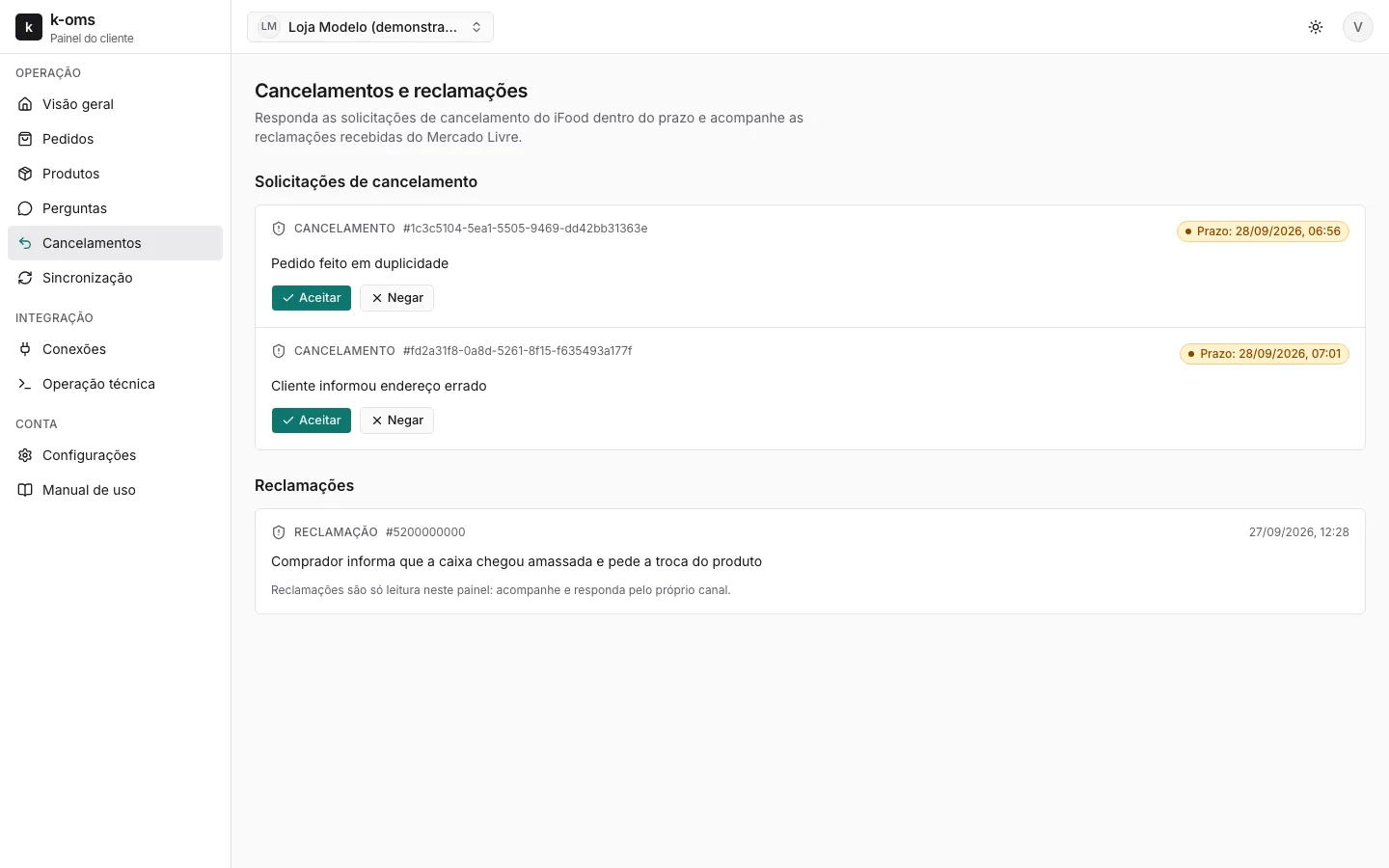
iFood cancellations
Cancellation requests with the deadline to accept or refuse.
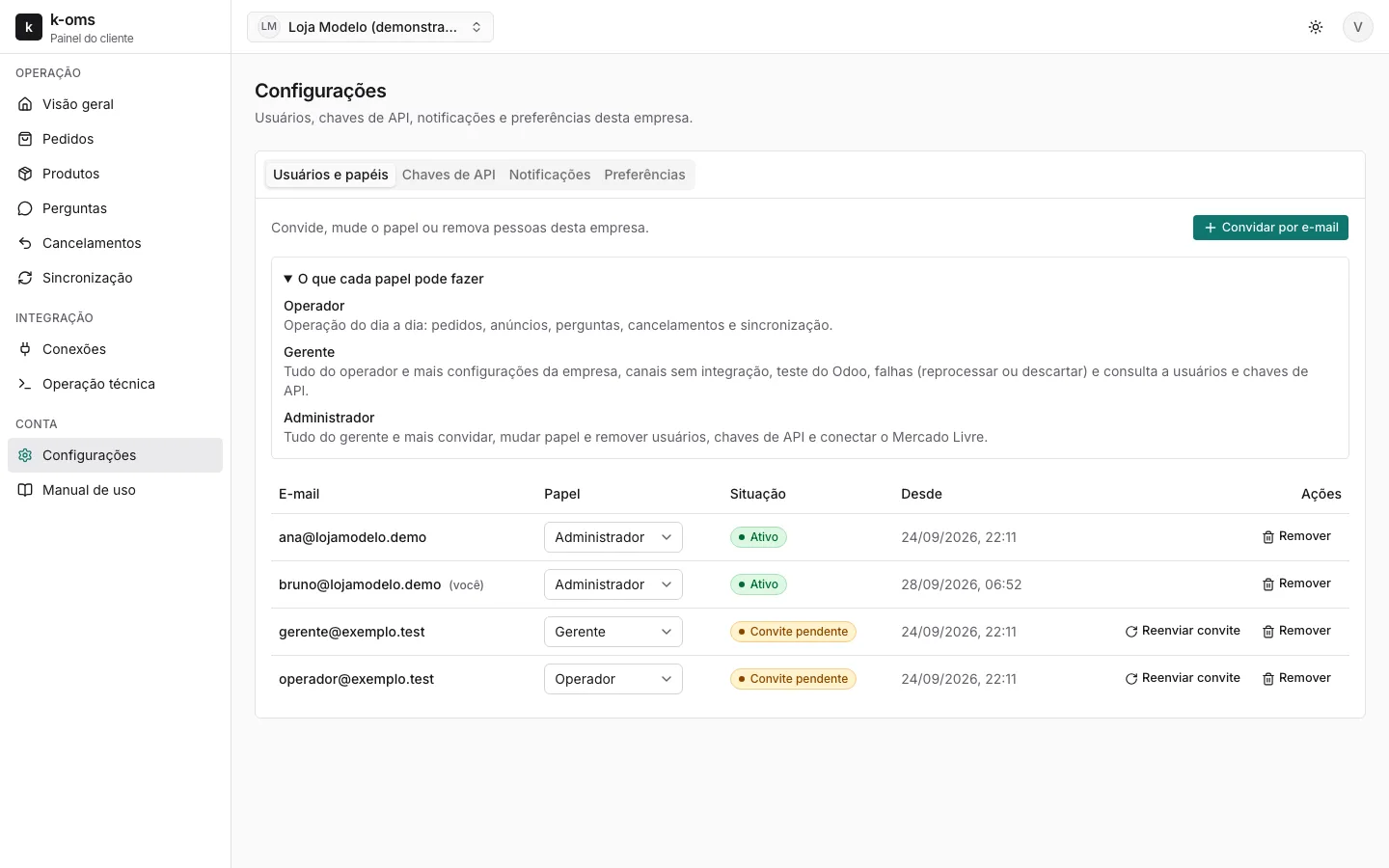
Users and roles
The company itself invites the team by email and sets what each person can do.
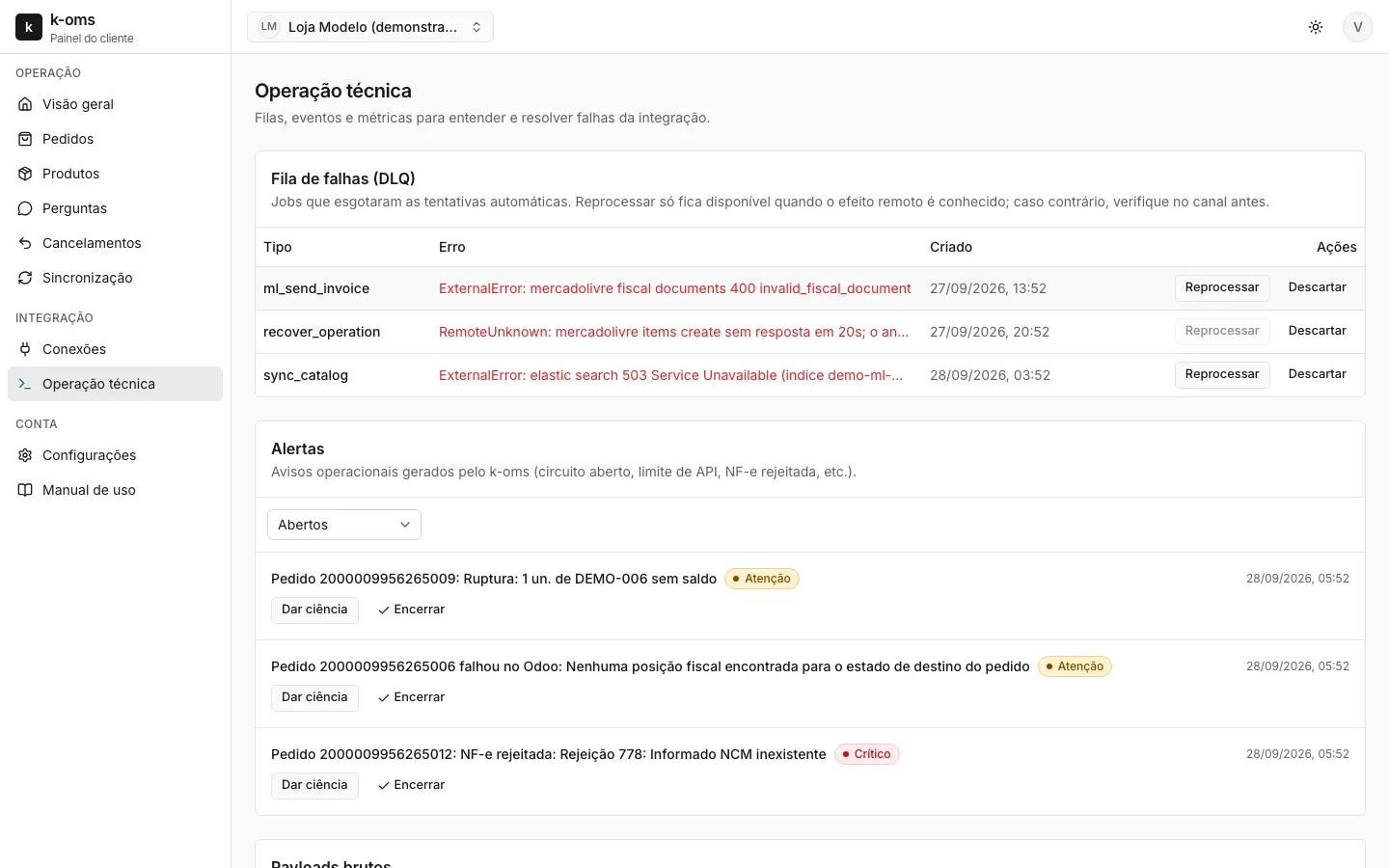
Technical operations
Error queue with safe reprocessing, alerts and the history of each integration.
Dashboard screens with fictitious demo data.
What each channel does
Direct integration with each channel's official APIs, no spreadsheet or bot in between: fewer parts to break. And it is multi-store: connect one or more accounts on each channel.
Mercado Livre
- Seller account connected by the customer, through the official Mercado Livre authorization
- Imports your existing listings and links each one to the Odoo product, with review of what does not match
- Duplicate listing with the same SKU: you choose in the dashboard which one K-OMS updates, without creating another
- Creates new listings from the product's Mercado Livre tab: category, attributes, listing type and GTIN
- Price from the channel price list and warehouse stock with a safety margin
- Orders and carts become sales orders in Odoo, with the full customer data for the NF-e
- Authorized NF-e sent to the order, Mercado Envios label and tracking until delivery
- Questions and claims in a queue with deadlines
iFood
- Menu built in Odoo (categories, items, add-ons and hours) and published on iFood
- Unavailable item and paused store from Odoo
- Order received, confirmed automatically or by your KDS, and followed until dispatch
- NFC-e issued by Odoo with iFood as the intermediary
- Cancellation by the customer or by the store, with deadline and refund in Odoo
Built not to lose orders
Marketplace integrations fail: the network drops, the channel repeats notifications, the ERP is slow. K-OMS was designed for these cases.
These behaviors are covered by automated tests with simulated failures: duplicate notification, response lost after writing to Odoo, and processing interrupted halfway.
An order never enters twice
A repeated channel notification is recognized and discarded; the sales order is created only once.
Sold stock does not go back on display
While the order is on its way to Odoo, committed stock is not republished to the channels.
Every failure is visible
What went wrong goes to the error queue with the reason, and is only reprocessed when it is safe.
Who did what
Audit trail of dashboard actions, including KMEE support access.
Data separated by company
Each company sees only its own data. Buyer data is masked, and whoever reveals it is logged.
Onboarding, access and support
KMEE puts it live. After that, your company runs the day to day without opening a ticket for every change.
Onboarding by KMEE
KMEE registers the company, connects your Odoo and the channel accounts, and invites the first administrator. Dedicated production environment, with backup and alerts.
Mercado Livre connected by you
The administrator clicks Connect to Mercado Livre and authorizes with their own seller account. KMEE never asks for or stores the channel password.
Your team, your roles
Email invitation, password created from the link, and three roles: operator, manager and administrator. The company invites, changes roles and removes people on its own.
Logged support
When KMEE needs to enter your company to help, it opens a support session with a reason and a time limit. Everything done is kept in the audit trail.
Manual inside the dashboard
A complete user manual, with the screens and what each role can do, ready to print as PDF.
Channels
The channels K-OMS integrates today and the ones coming next. A new channel uses the same Odoo catalog and the same dashboard: you switch the channel on, you do not restart the project.
| Channel | Status | |
|---|---|---|
| Mercado Livre | Marketplace | Available |
| iFood | Food delivery | Available |
| Amazon | Marketplace | Coming soon |
| Shopee | Marketplace | Coming soon |
| Magazine Luiza | Marketplace | Coming soon |
| Americanas | Marketplace | Coming soon |
| Rappi, 99Food and Keeta | Food delivery (Open Delivery) | Coming soon |
| k-shop, KMEE's online store, integrated directly with Odoo | Online store | Available |
| Nuvemshop, WooCommerce and VTEX | Online store | Coming soon |
Frequently asked questions
What does OMS stand for?
Order Management System. In K-OMS it is the layer that brings the orders from every channel into one place and takes each one to Odoo, with the invoice, label and tracking sent back to the channel.
Do I need to change ERP?
No. K-OMS was made for Odoo: catalog, stock, orders and invoices stay there. K-OMS sits between Odoo and the channels.
Which Odoo version is supported?
Odoo 16 or later, with the KMEE channel modules installed. If your version is different, the assessment shows the path.
Will you integrate other channels?
Yes. Amazon, Shopee, Magazine Luiza, Americanas, the Open Delivery food apps (Rappi, 99Food and Keeta) and the Nuvemshop, WooCommerce and VTEX online stores are on the way. KMEE's own online store, k-shop, already works integrated directly with Odoo. Each new channel plugs into the same Odoo catalog and the same dashboard. If one of them is a priority for your operation, tell us in the assessment: the order of the queue takes into account who will use it.
I have more than one Mercado Livre account or more than one iFood store. Does it work?
Yes, K-OMS is multi-store. Each company connects one or more accounts on each channel, and each account sells through its own sales channel in Odoo. The catalog stays single, and orders and listings show up in the dashboard with their store of origin. If you have more than one company, each one has its own space, and people who work in both switch companies right in the dashboard.
I already have listings on Mercado Livre. Do I lose anything?
No. K-OMS imports existing listings and links each one to the Odoo product by SKU or GTIN. What does not match stays pending for you to decide; nothing is linked blindly. If the same SKU has more than one listing, the dashboard shows the candidates and you choose which one K-OMS keeps updated; the others stay as they are.
Who on my team can access the dashboard?
Whoever the company administrator invites. Each person gets an email invitation, creates their own password and signs in with a role: operator (day to day), manager (settings and failures) or administrator (users, API keys and the Mercado Livre connection).
Does KMEE access my data?
Only to provide support, and with a record. The KMEE team opens a support session with a reason and a time limit, and every action goes to your company's audit trail.
Does the kitchen need another screen for iFood?
Not necessarily. The order can be confirmed automatically when it enters Odoo, or by a KDS, through the K-OMS orders API.
How does the invoice inform the marketplace?
The NF-e and NFC-e leave Odoo with the intermediary group filled in (channel CNPJ and seller identification), as required by NT 2020.006. KMEE is among the maintainers of the Brazilian fiscal localization of Odoo in the OCA community, the same one that issues these invoices.
How much does it cost?
It depends on the channels, the order volume and what needs to be configured in your Odoo. In the free assessment KMEE maps this with you and presents a proposal with scope, timeline and price, with no commitment.
Start with a free assessment
Thirty minutes to understand your operation and tell you what to fix first, in the right order. No commitment.